aeVolumeRays — A free volumetric god rays tool for Nuke
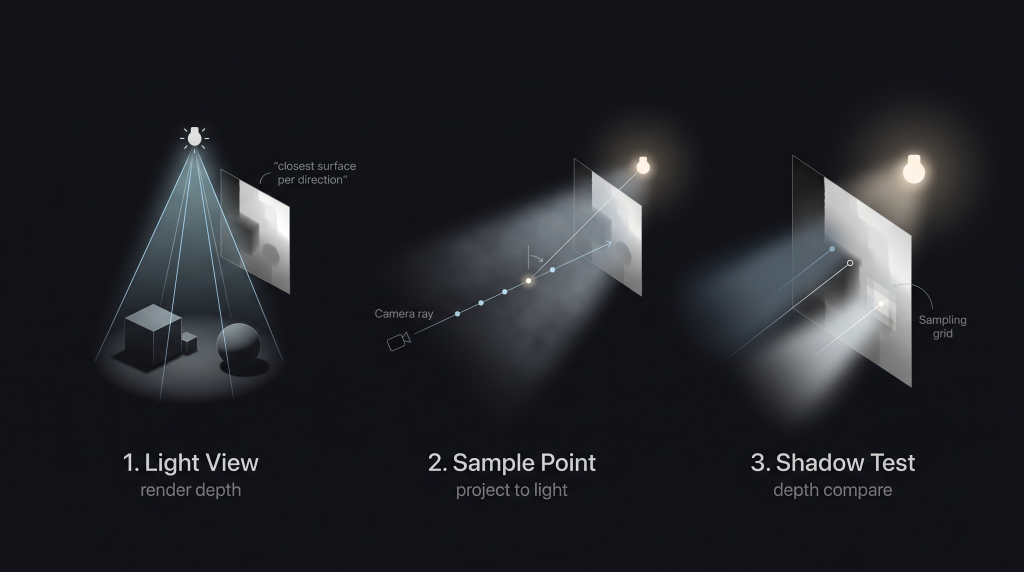
aeVolumeRays is a free volumetric lighting tool for Nuke that brings real-time, physically-inspired god rays directly into the compositing workflow.
Instead of relying on expensive ray tracing, it uses a shadow map–based approach to determine light visibility at each sample point. Every step along the camera ray performs a simple depth lookup from the light’s point of view, allowing for fast, scalable volumetric shadows that hold up in production.
The result is a system that feels physically grounded, yet remains interactive — capable of rendering soft, atmospheric light beams with believable occlusion, directly inside Nuke.
Built for artists who need both control and performance, aeVolumeRays exposes key parameters like sampling density, anisotropy, and PCF-based shadow softness, making it easy to dial anything from subtle haze to cinematic god rays.
No simulations. No heavy renders. Just a smart approximation that works.
The Next Frame 02: Current State of the Art
Explore the cutting edge of visual effects in this deep dive into concept art, previs, look development, layout, and more. Learn how top studios blend traditional artistry with real-time tools, AI, and virtual production to shape the future of VFX.
The Next Frame 01: The Evolution of Visual Effects and Animation
Explore the rich history of visual effects and animation—from 19th-century experiments to today’s cutting-edge digital techniques. Perfect for VFX professionals and creative tech enthusiasts.
Mastering Nuke’s CopyCat: ML for Compositing & VFX
Discover how to harness Nuke’s CopyCat tool to streamline VFX workflows. This guide by Aitor Echeveste delves into training custom models for tasks like rotoscoping and cleanup, enhancing compositing efficiency.
Free CGI Top Resources for Stunning Compositing Shots
Master Nuke with expert VFX compositing best practices. Boost efficiency, organization, and creativity with tips to elevate your skills to professional standards.
Master Nuke with expert VFX compositing best practices
Master Nuke with expert VFX compositing best practices. Boost efficiency, organization, and creativity with tips to elevate your skills to professional standards.
aeShadows

An easy way to add or remove new shadows to your plate. By Aitor Echeveste.
aeDirtCG
Enhance the intricacy of your CG renders swiftly with the ability to fine-tune all your noise patterns and conveniently export them for versatile usage. This tool seamlessly accommodates both 2D and full Deep workflow.
Inteligencia Aritifial Hoy

Stay informed about the latest AI trends and developments with our comprehensive collection of news and articles. Browse our website for the most up-to-date information on AI news and articles.
aeUVChart & aePrefMaker

Use aeUVChart to manage your uvs and export it, especially when you have all of them in different coordinates.
Use aePrefMaker yo create a pref pass with your geo and camera directly in nuke.